
Our software Ready now
Wholesale Distribution Software: Billing, Stock and Accounts in One System
M-Tech Logistics is wholesale distribution software. It records sales, purchases, payments and expenses, and from those entries it keeps your stock, your customer and supplier ledgers, your cash and bank balances and your profit and loss.
How does it handle sales and purchase invoices?
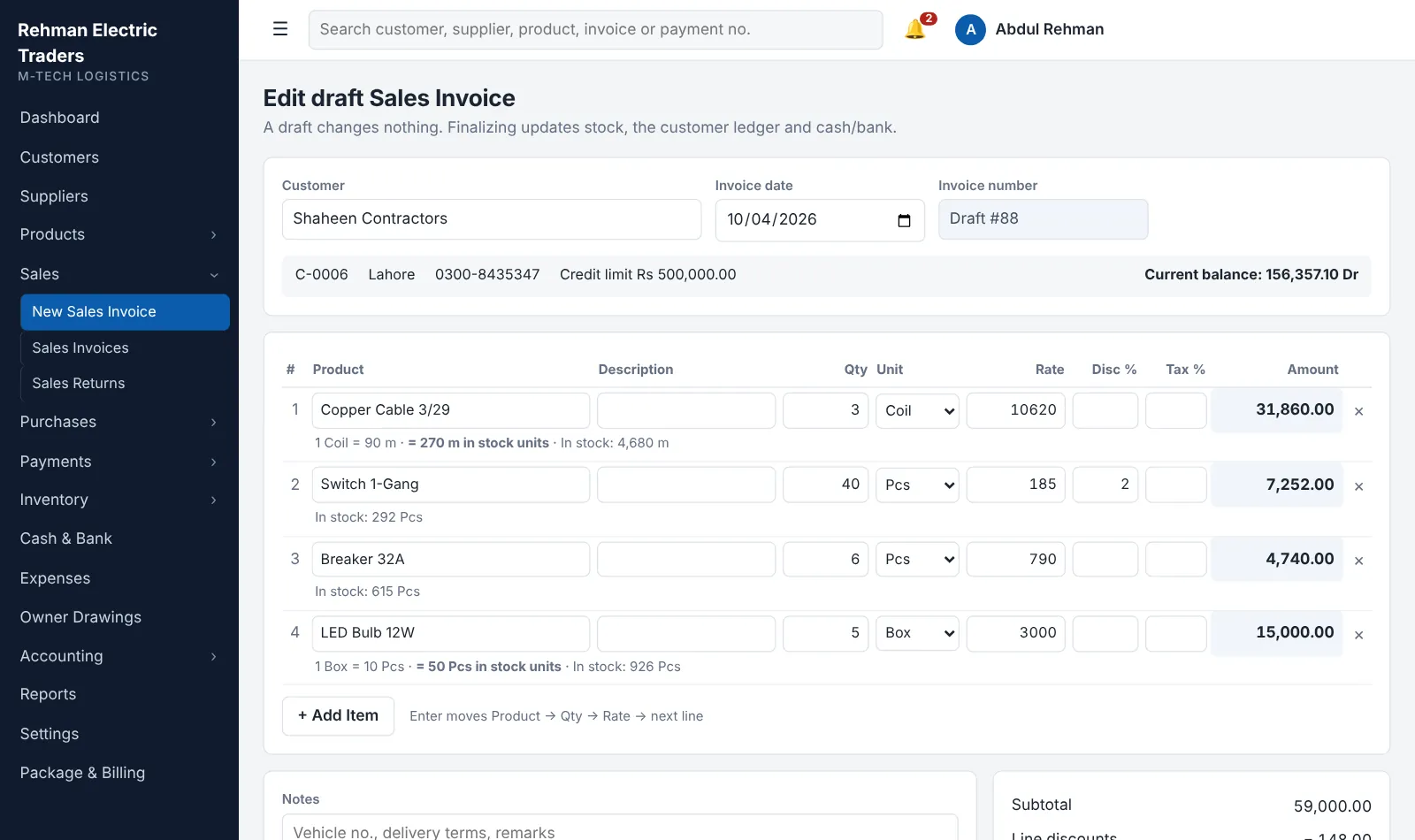
It makes a sales or purchase invoice on one screen and posts it to stock, the party ledger and cash in one step.
- Pick the customer; the current balance and credit limit appear.
- Add products by name, SKU, brand or part number; choose the unit; set discount and tax per line.
- Save as a draft (changes nothing) or finalize (numbered and posted).
- Record money received on the same invoice; it becomes a payment automatically.
- A finalized invoice is never edited. It is reversed and kept on record.
How does it keep customer and supplier ledgers?
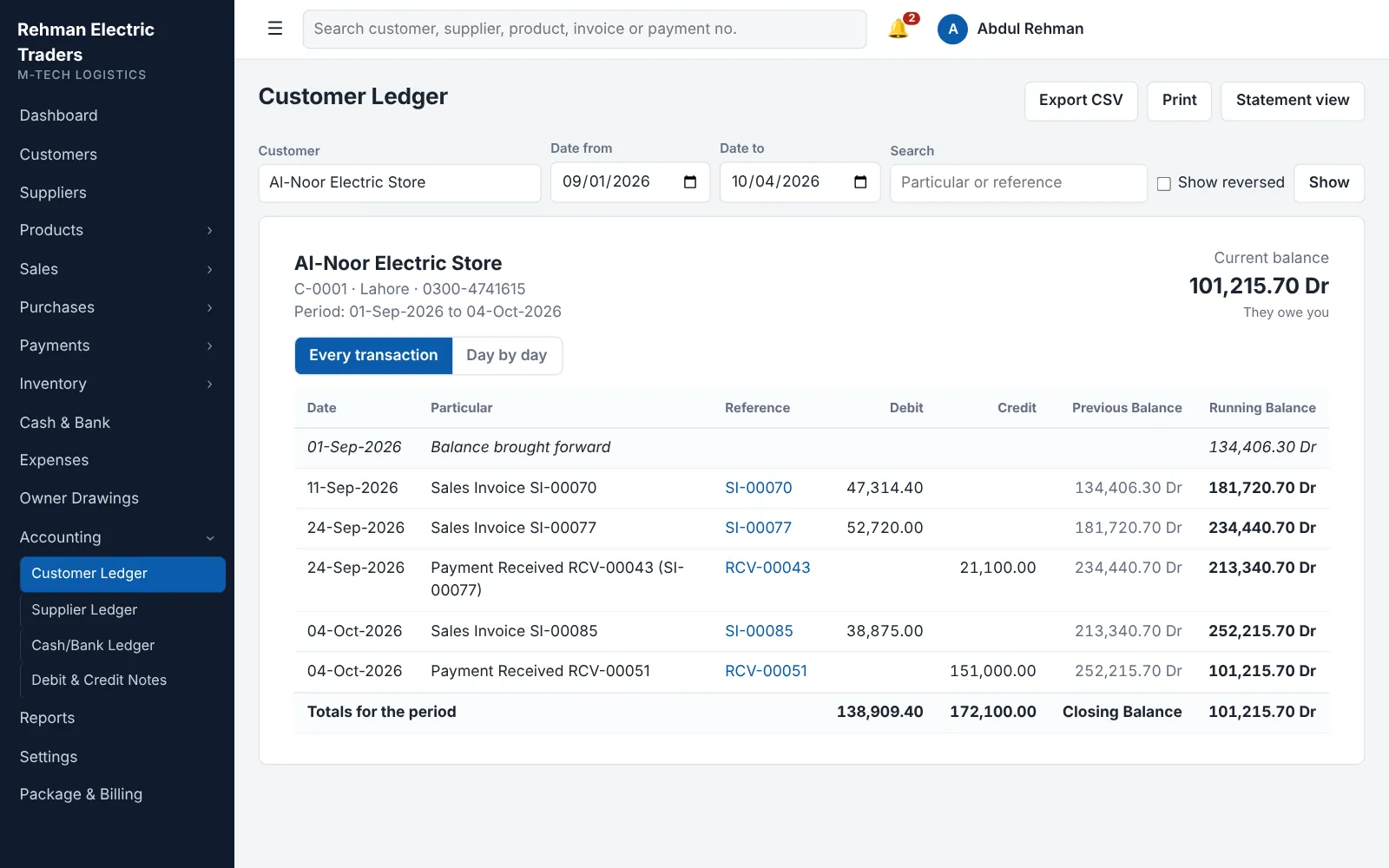
It keeps a running ledger for every customer and supplier, calculated in date order, so a back-dated entry corrects every later balance.
- Opening balance, every invoice, return, payment and note in one list.
- Previous balance and running balance on every row, and a day-wise view.
- Printable statement for any period.
- Credit limit per customer, with an alert when it is crossed.
- How a running ledger (khata) works and how to manage udhaar.
How does it manage stock?
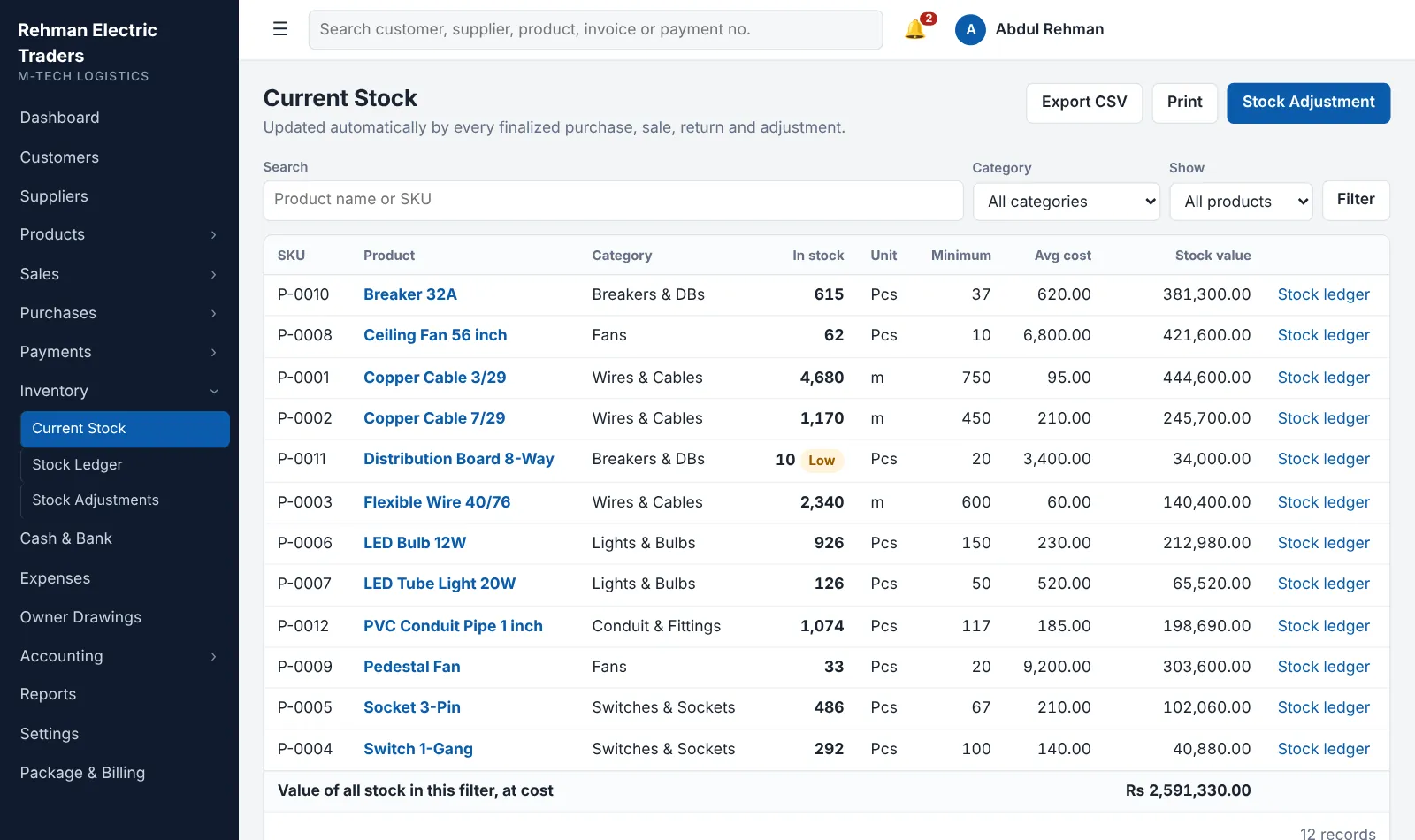
It moves stock from the documents themselves: a purchase brings stock in, a sale takes it out, a return puts it back.
- Stock ledger for each product: date, document, quantity in, quantity out, balance.
- Minimum level per product and a low-stock list.
- Stock adjustments for damage, shortage or found stock after a physical count.
- A sale that would take stock below zero is refused, unless you allow it in settings.
- Stock is valued at weighted average cost. Stock management explained.
How does it handle cartons, dozens, pieces and kilograms?
It stocks each product in one unit and converts other units by rules that you set, such as 1 Carton = 24 Piece or 1 Ton = 1,000 Kilogram.
- A rule can apply to every product or to one product only; the product's own rule wins.
- The invoice shows the quantity you billed and the quantity in stock units.
- Nothing is assumed: a unit without a rule is refused with a clear message.
- A saved invoice keeps the factor it used, even if the rule changes later.
Selling in cartons, dozens and pieces: how unit conversion works.
How does it track cash, bank, expenses and drawings?
It passes every rupee through a cash or bank account, each with its own running ledger.
- Customer receipts and supplier payments by cash, bank transfer, cheque or online.
- Transfers between cash and bank accounts.
- Expenses under your own heads: rent, salaries, electricity, transport.
- Owner drawings recorded apart, so personal spending never lowers the profit figure.
- A payment larger than the account balance is refused, unless you allow it.
How does it handle returns and corrections?
It makes a return from the original invoice, so quantities, rates and costs come from the bill and cannot exceed what was sold or bought.
- Sales return: goods come back into stock at their original cost and the customer is credited.
- Purchase return: goods leave stock and the supplier's balance falls.
- Debit and credit notes change a balance without moving goods, for a rate difference or a charge.
Which reports does it give?
It gives the reports a distributor checks daily and monthly, each with a date range, search, print and Excel (CSV) export.
- Sales report, sales by product and purchase report.
- Customer outstanding and supplier outstanding.
- Inventory report and stock movement.
- Payment, expense, cash and bank reports.
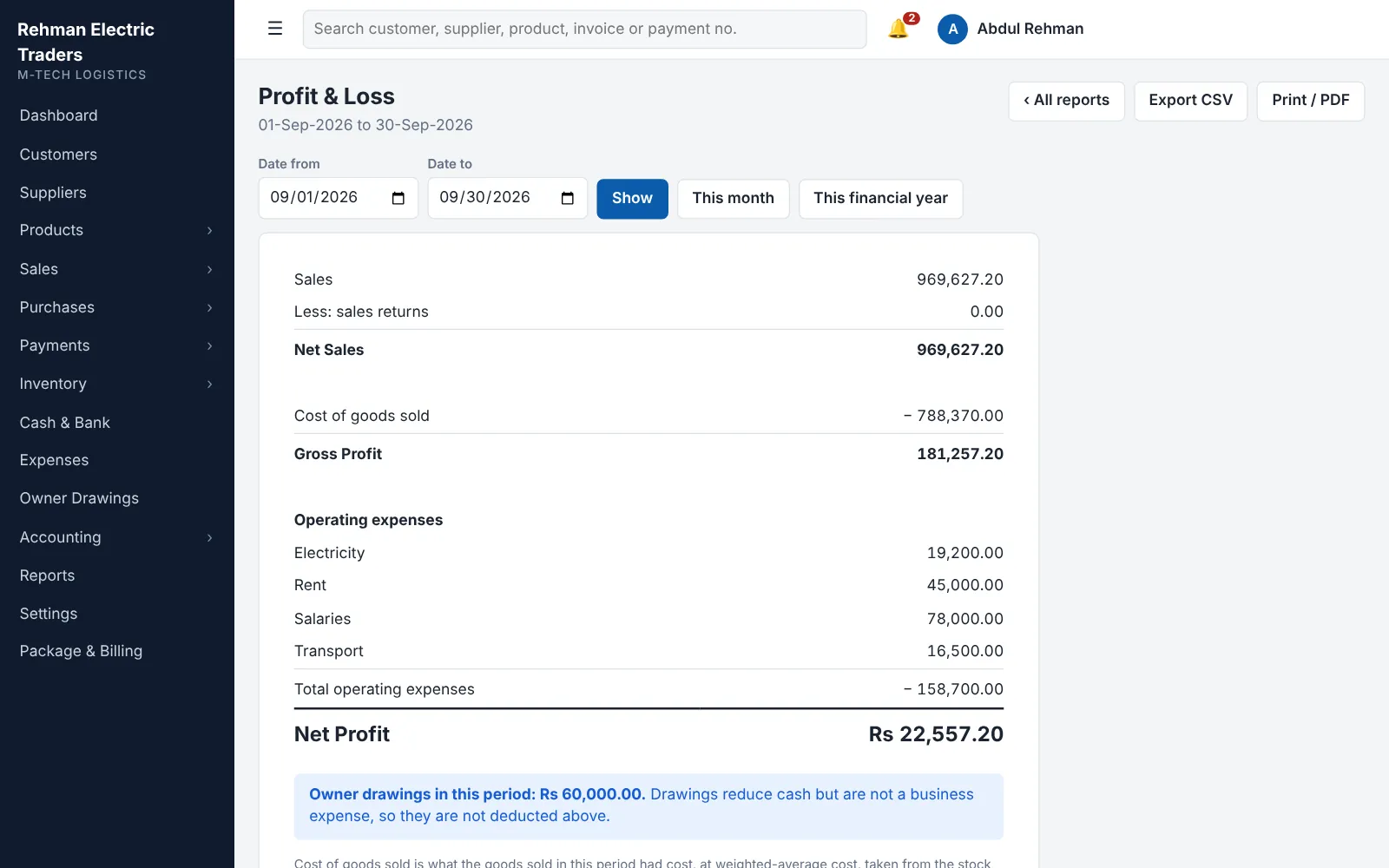
- Profit and loss: net sales, cost of goods sold, gross profit, expenses, net profit.
- The 9 reports every distributor should check.
How does it keep the business safe?
It gives each person their own login with a role, and records every action.
- Admin, manager and staff roles; you choose what manager and staff can open.
- An audit trail of who created, finalized, reversed or changed what, and when.
- Passwords are stored as one-way hashes; five wrong attempts lock the login for 15 minutes.
- Each business sees only its own data.
Is it set up for your type of business?
Yes. Your account starts with the units, categories, expense heads and product details of your trade.
Software for Electrical Distributors and Wholesalers
Wires, cables, switches, breakers, fans and lights.
Software for Hardware Distributors and Wholesalers
Tools, fasteners, paints, plumbing and sanitary fittings.
Software for Building Material Dealers and Distributors
Cement, steel, bricks, sand, crush, tiles and pipes.
Software for FMCG Distributors
Beverages, snacks, grocery, personal care and household goods.
Software for Medical and Surgical Distributors
Surgical instruments, disposables, diagnostics and hospital equipment.
Software for Auto-Parts Distributors and Wholesalers
Engine parts, filters, brakes, oils, tyres and body parts.
Software for Electronics and Mobile Accessories Wholesalers
Mobile accessories, home appliances, computers, cables and batteries.
Software for Garment, Cloth and Textile Wholesalers
Fabric, unstitched suits, readymade garments, hosiery and yarn.
Software for Industrial Equipment and Spare Parts Suppliers
Machinery, motors, pumps, bearings, safety equipment and spare parts.
Software for General Trading and Distribution Businesses
Any goods bought in bulk and sold to shops or businesses.
What does it not do?
It does not do the following in this version. If you need one of them, tell us; it can be added as custom work.
- Batch-wise or expiry-wise stock. Batch number and expiry date can be recorded on a product, but stock is counted per product.
- Serial number or IMEI tracking.
- Barcode scanning at a retail counter.
- Sending invoices to FBR. Tax is calculated and printed, not submitted.
- More than one currency. Amounts are in Pakistani rupees.
Frequently asked questions
What is wholesale distribution software?
Wholesale distribution software is a program that joins billing, inventory, customer and supplier accounts and cash for a business that buys in bulk and sells to other businesses. Read the full explanation.
Does it work on a mobile phone?
It runs in a web browser and is designed for a computer, laptop or tablet, where invoices are comfortable to enter.
How many users can use it?
From 1 user on the first package to 8 on the fourth; the custom package has no fixed limit. See pricing.
Can I start in the middle of the year?
Yes. Enter opening balances of customers, suppliers, stock, cash and bank as of your starting date and continue from there.
Is it better than Excel?
Excel records figures but does not connect them. Register, Excel or software compared.
Try the software with your own data
Start a free trial. We set up your account for your type of business.